2
আর মাত্র 5টি আছে
একটি চ্যানেল বেছে নিন — আমরা যত দ্রুত সম্ভব উত্তর দেব
আর মাত্র 5টি আছে
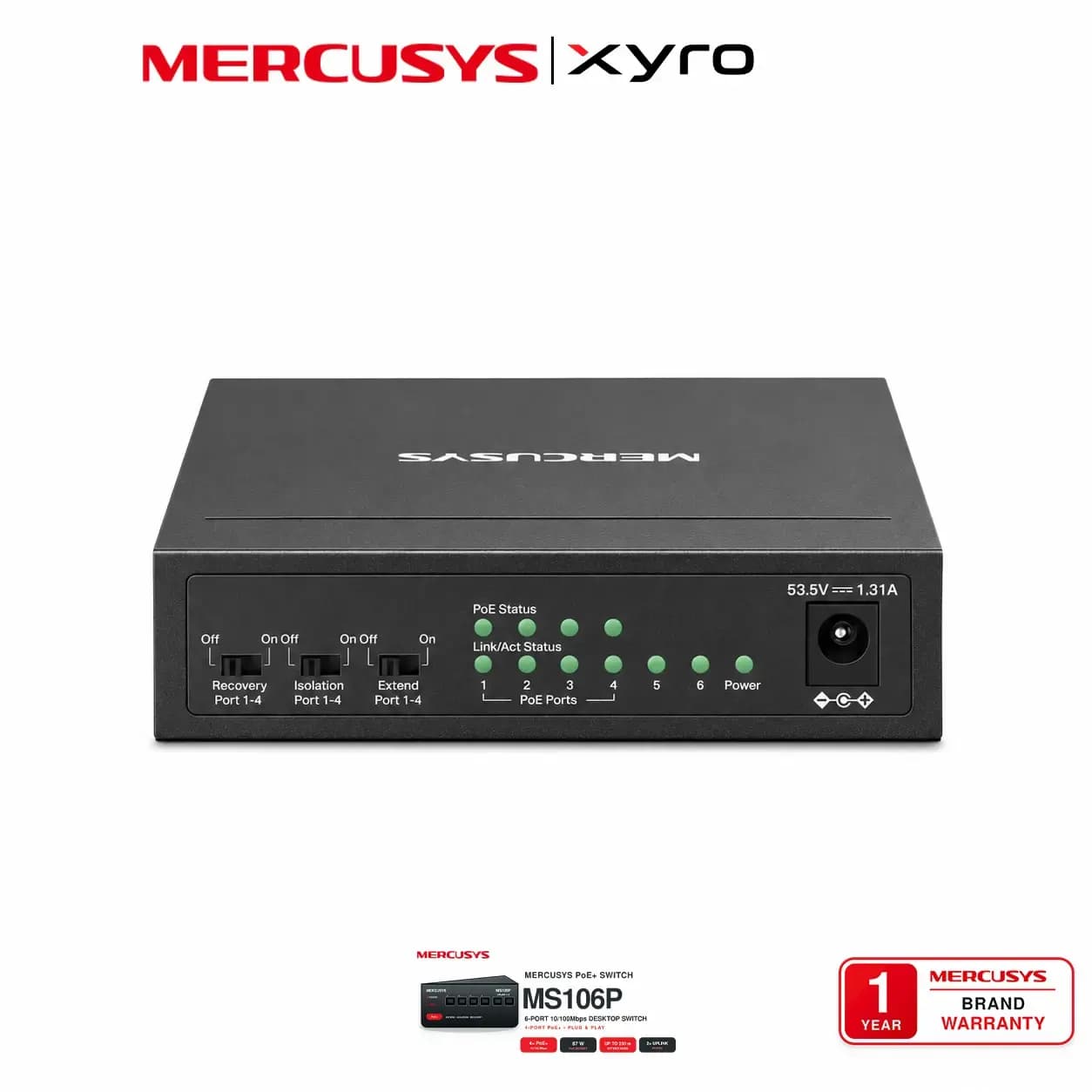


Explore MERCUSYS MS106P at XyroBD with six 10/100Mbps ports, four PoE+ ports, a 67W PoE budget and fanless design. Check the price in Bangladesh.
MERCUSYS MS106P Price in Bangladesh
MERCUSYS MS106P 6-Port 10/100Mbps Desktop Switch with 4-Port PoE+ Price in Bangladesh – XyroBD
The MERCUSYS MS106P 6-Port 10/100Mbps Desktop Switch with 4-Port PoE+ provides wired connectivity and power for compatible surveillance and office devices. Its four PoE+ ports carry power and data through Ethernet cables, while two non-PoE uplink ports connect equipment such as a router and network video recorder.
With a shared 67W PoE budget, the MS106P supports IEEE 802.3af/at powered devices and supplies up to 30W per PoE port, within the total power limit.
The compact, fanless metal housing supports desktop or wall-mounted installation. Plug-and-play operation, Isolation Mode and PoE Auto Recovery simplify deployment and everyday operation.
Six Fast Ethernet ports: All RJ45 ports support 10/100Mbps.
Four PoE+ ports: Power compatible devices through ports 1–4.
67W shared PoE budget: Up to 30W per port within the total budget.
Two uplink ports: Connect a router, NVR or other wired equipment.
IEEE 802.3af/at compatibility: Supports suitable IP cameras, access points and IP phones.
Extend Mode: Up to 250 metres on PoE ports at 10Mbps.
Isolation Mode: Separate traffic between ports 1–4 while retaining uplink access.
PoE Auto Recovery: Restart unresponsive powered devices when enabled.
Fanless metal housing: Compact design for desktop or wall mounting.
Plug-and-play setup: Automatic negotiation and MDI/MDIX detection.
| Feature | Specification |
|---|---|
| Brand | MERCUSYS |
| Model | MS106P |
| Switch Type | Unmanaged Fast Ethernet PoE+ Desktop Switch |
| Total Ethernet Ports | 6 × 10/100Mbps RJ45 |
| PoE+ Ports | 4 × 10/100Mbps, ports 1–4 |
| Non-PoE Uplink Ports | 2 × 10/100Mbps, ports 5–6 |
| PoE Standards | IEEE 802.3af/802.3at |
| Maximum PoE per Port | 30W, subject to the total PoE budget |
| Total PoE Budget | 67W rated |
| Switching Capacity | 1.2Gbps |
| Forwarding Method | Store-and-forward |
| MAC Address Table | 2K entries with automatic learning and aging |
| Auto-Negotiation | Supported |
| Auto MDI/MDIX | Supported |
| Flow Control | IEEE 802.3x |
| Extend Mode | Ports 1–4; up to 250m at 10Mbps |
| Isolation Mode | Separates ports 1–4 from each other while allowing communication with uplinks 5–6 |
| PoE Auto Recovery | Supported when enabled |
| Enclosure | Metal |
| Cooling | Fanless |
| Installation | Desktop or wall mount |
| Power Adapter Output | 53.5V DC, 1.31A |
| Power Adapter Input | 220–240V AC, 50/60Hz |
| LED Indicators | Power, Link/Act and PoE Status |
| Dimensions | 99.8 × 98 × 25mm |
| Operating Temperature | −20°C to 40°C |
| Certifications | CE and RoHS |
Connect and power compatible cameras and office devices through Ethernet cables.
Use separate uplinks for a router and NVR.
Extend suitable surveillance connections beyond standard cable distances.
Install a compact, fanless switch where space is limited.
Check the MERCUSYS MS106P price in Bangladesh at XyroBD. Confirm stock availability, hardware revision and applicable warranty terms before ordering.
MERCUSYS MS106P Switch
Power Adapter
Rubber Feet
Quick Installation Guide
What is the MERCUSYS MS106P price in Bangladesh?
Check the current XyroBD product listing for price and availability.
Does the MS106P support Gigabit connections?
All six ports support 10/100Mbps. Ports operating in Extend Mode run at 10Mbps.
Can all four PoE ports supply 30W simultaneously?
Each PoE port supports up to 30W, while the combined PoE load must remain within the shared 67W budget. Check your devices’ total power requirements.
How does the 250-metre Extend Mode work?
Extend Mode supports power and data transmission up to 250 metres on ports 1–4 at 10Mbps. Actual distance depends on cable quality, cable type and device power requirements.
Which devices can receive PoE power?
Compatible IEEE 802.3af/at devices, including supported IP cameras, wireless access points and IP phones. Confirm each device’s PoE standard and power needs.
What happens when Isolation Mode is enabled?
Ports 1–4 cannot communicate directly with each other. They can communicate with uplink ports 5–6, allowing connected devices to reach upstream equipment.
XYRO – Your Trusted Destination for Original Gadgets & Accessories.